How ExequtechOS Connects Your Entire Business Workflow — From Quote to Payment
See how quotations, jobs, technicians, purchasing, inventory, projects, invoicing, payments and profitability connect in one operational workflow.
Running a service, trade or contracting business is not a collection of separate tasks. A quotation can become a job. That job needs people, materials and sometimes purchasing. Work completed in the field affects stock, labour costs, invoicing and ultimately profitability.
ExequtechOS connects these processes in one business and field-service management platform. Instead of treating quotations, jobs, technicians, purchasing, inventory, projects, invoices, debtors and assets as isolated functions, information can move through the operational workflow of the business.
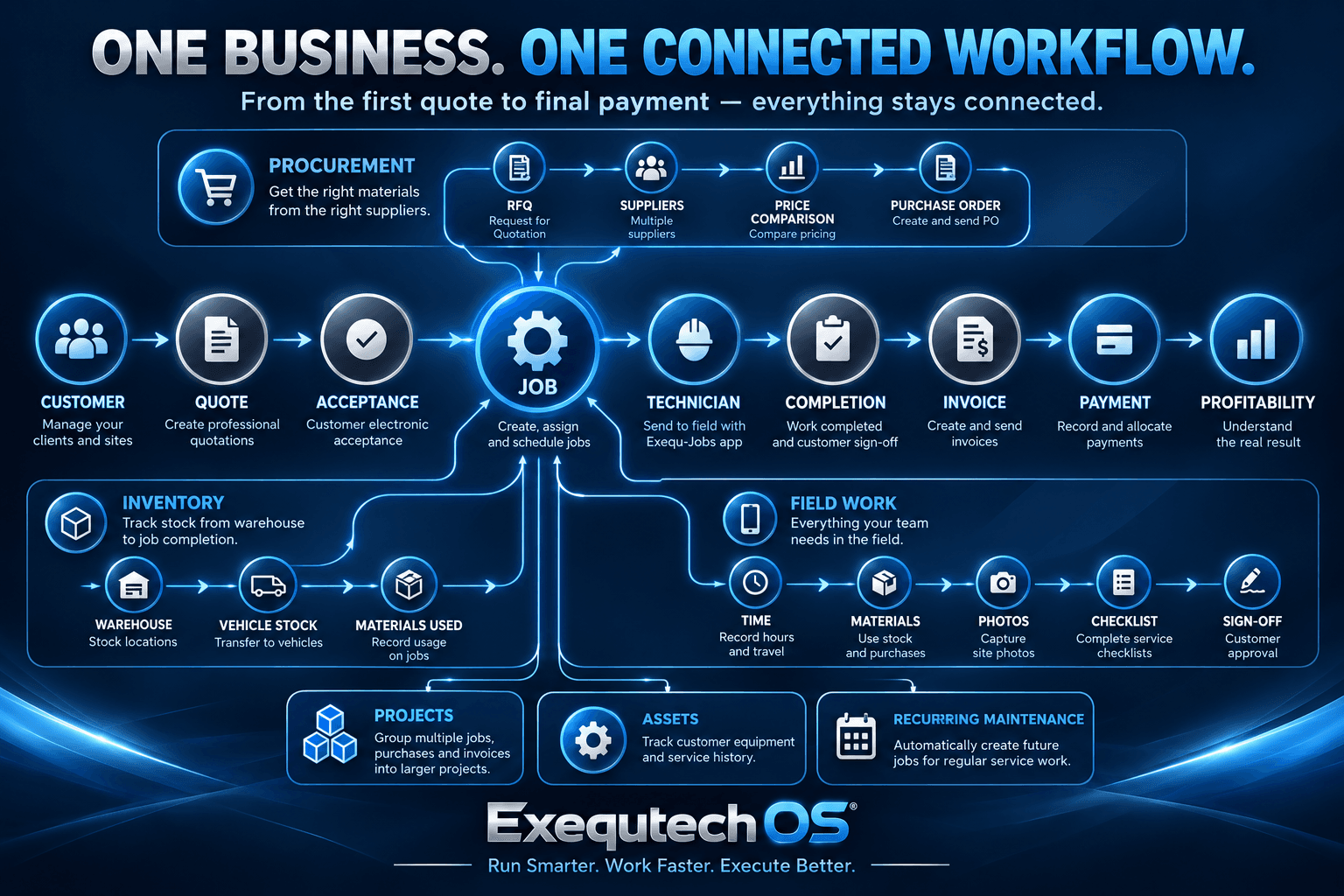
The ExequtechOS Workflow at a Glance
A typical customer workflow in ExequtechOS can look like this:
But that is only one workflow. Behind the job, ExequtechOS can also connect purchasing, suppliers, inventory, vehicle stock, fixed assets, recurring work and projects.
1. From Customer Enquiry to Quotation
The workflow can begin with a customer and a quotation. A business creates the customer in ExequtechOS and prepares a professional quotation. The quotation can be emailed as a PDF with an electronic acceptance link. The customer does not need to install an application or create an account; they can review and accept the quotation, with that acceptance recorded in the system.
The quotation therefore does not have to remain an isolated document. It can become the starting point for the operational and financial processes that follow.
2. From Quotation to Job
Once work needs to be performed, a job card can carry the operational side of the work. The office can create, assign and schedule the job while keeping the relevant customer, project and work information connected. Jobs can include site information, assigned technicians, scheduled dates, tasks, service requirements, materials, labour, travel, photos, purchases, checklists and customer sign-off.
3. From the Office to the Technician in the Field
Once a job is assigned, the technician can receive it on the Exequtech mobile field application, accept it and update its progress. During the job, technicians can record travel, start and stop times, team members, working hours, materials, site photos, ad-hoc purchases, checklist results and completion information. The field application is designed to continue working when an internet connection is unavailable and synchronise when connectivity returns.
4. From Completed Work to Customer Sign-off
Completing the technical work is not necessarily the end of the job. A customer can receive a link to review the completed work, provide feedback and sign off, creating a clearer connection between what was requested, what happened in the field and completion of the job.
5. From Materials Required to Supplier Purchase Order
When materials need to be sourced, a business can create a Request for Quotation and send it to multiple suppliers. Suppliers can enter their pricing through a link without needing an ExequtechOS account. Returned supplier pricing can be compared before a purchase order is created. Purchase orders can be associated with the relevant job or project.
6. From Purchasing to Inventory
ExequtechOS supports stock across locations such as warehouses and vehicles. Materials can move through purchasing, receiving, storage, reservation and eventual consumption on a job. Stock can be reserved before it is consumed, and reserved material that was not used can be returned rather than incorrectly treated as consumed.
7. Connecting Vehicle Stock to Field Work
Materials can be transferred to vehicle stock so technicians have the items they need in the field. When material is used on a job, that usage can be recorded against the work performed.
8. Connecting Labour to the Actual Job
Technicians can record their working time directly against jobs, while team members working with them can also have their time recorded. Together with material usage, this gives the business a clearer picture of what actually happened after the quotation was approved.
9. From Job to Invoice and Payment
ExequtechOS includes invoicing, debtors and payment allocation alongside its operational tools. Invoices can be emailed to customers and outstanding balances tracked through debtor ageing. Payments can be captured and allocated across invoices, including partial payments and payments covering multiple invoices.
10. Connecting the Quote to Actual Job Profitability
A quotation represents what the business expected before work started. The completed job shows what actually happened. ExequtechOS can help compare quoted expectations with actual labour and material activity, so the business understands how the commercial outcome compared with what was originally expected.
11. Connecting Multiple Jobs Through Projects
Not every project consists of a single job card. ExequtechOS projects can group related work so multiple job cards and related commercial documents remain connected to the larger project.
12. Connecting Customer Assets to Their Service History
For maintenance businesses, knowing what equipment was serviced can be as important as knowing which customer was visited. ExequtechOS can connect service work to assets so businesses can build a history around equipment being maintained. Service templates can define required checks and measurements, helping technicians follow a consistent process.
13. Connecting Recurring Maintenance to Future Jobs
ExequtechOS supports recurring jobs for maintenance that needs to happen on a daily, weekly, monthly or yearly cycle. Recurring schedules can automatically generate future job cards according to the configured schedule.
Why These Connections Matter
ExequtechOS includes customer management, quotations, job cards, field-service tools, projects, purchasing, supplier RFQs, inventory, fixed assets, invoicing, debtors, creditors, staff hours and reporting. The important part is that these functions can participate in the same operational workflow.
A material used by a technician is related to a job. The job is related to a customer. The purchase order can be related to that job or project. Labour is recorded against the work. The invoice belongs to the financial side of the same business process.
A Complete Example
Consider an HVAC contractor receiving a request to replace and service equipment at a customer's premises. The complete workflow could include the customer, quotation and electronic acceptance; job creation and scheduling; material requirements and supplier RFQs; supplier price comparison and purchase order; receiving and reserving stock; technician travel, time, service checks, materials and photos; customer sign-off; invoicing, debtors and payment allocation; and finally review of actual job activity against what was originally expected.
What appears to be a collection of separate features is therefore one connected operational process.
ExequtechOS Is More Than Field Service Management
ExequtechOS includes field-service management, but its scope extends into the back-office processes that support field work. It combines job scheduling and technician activity with procurement, supplier management, stock control, projects, fixed assets and financial administration.
This makes ExequtechOS suitable for businesses that need more than a digital job card, but do not want their operation fragmented across numerous unrelated systems.
Frequently Asked Questions
What is ExequtechOS?
ExequtechOS is a business and field-service management platform that connects customers, quotations, jobs, technicians, projects, purchasing, suppliers, inventory, assets, invoicing and financial administration within one system.
Is ExequtechOS only a job card system?
No. Job management is one part of ExequtechOS. The platform also includes quotations, supplier RFQs, purchase orders, stock and inventory management, projects, fixed assets, invoices, debtors, creditors, staff hours and reporting.
Does ExequtechOS include purchasing and supplier management?
Yes. Businesses can request quotations from multiple suppliers, receive supplier pricing through online links, compare pricing and create purchase orders associated with jobs and projects.
Does ExequtechOS manage inventory?
Yes. ExequtechOS supports inventory across locations including warehouses and vehicles. Stock can be reserved for jobs, transferred between locations, recorded as used and returned when reserved material is not consumed.
Can technicians use ExequtechOS offline?
Yes. The Exequtech field application is designed for offline operation. Technicians can continue working when connectivity is unavailable and synchronise when an internet connection returns.
Does ExequtechOS support recurring maintenance?
Yes. Recurring work can be configured using scheduled intervals so future job cards can be generated automatically for regular maintenance and service work.
Who is ExequtechOS designed for?
ExequtechOS is designed for service businesses, trades, contractors and other organisations that need to coordinate customers, office administration, field workers, purchasing, materials, inventory and financial processes.
One System. Connected Workflows.
ExequtechOS is designed around the way work moves through a business.
Quote it. Plan it. Purchase it. Schedule it. Execute it. Track it. Invoice it. Get paid. Understand the result.
Frequently asked questions
What is ExequtechOS?
ExequtechOS is a business and field-service management platform that connects customers, quotations, jobs, technicians, projects, purchasing, suppliers, inventory, assets, invoicing and financial administration within one system.
Can technicians use ExequtechOS offline?
Yes. The Exequtech field application is designed for offline operation. Technicians can continue working when connectivity is unavailable and synchronise when an internet connection returns.
Does ExequtechOS support purchasing and inventory?
Yes. Businesses can request quotations from multiple suppliers, compare pricing, create purchase orders, reserve stock for jobs, transfer stock between locations, record material usage and return reserved material that was not consumed.
Does ExequtechOS support recurring maintenance?
Yes. Recurring work can be configured using scheduled intervals so future job cards can be generated automatically for regular maintenance and service work.
This article is general information, not financial, legal, or professional advice. Figures are industry estimates or illustrative examples — consult your accountant or advisor for guidance on your own numbers.